


Aetna Health
4.38.47K Reviews
App Specs
- Version
- 7.61.0.486-prod
- Updated On
- License
- Free
- Downloads
- 1,000,000+
- Developer
- Aetna Inc
- Categories
- Medical
- Platform
- Android, iOS
Screenshots
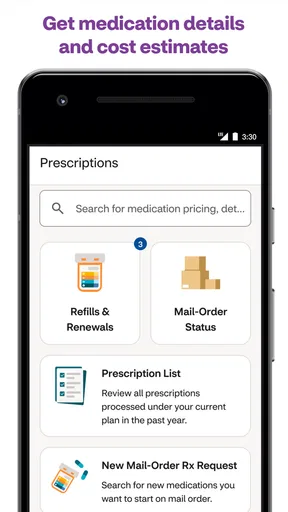
 Analysis by AppCompare
When I look at a health-insurance app, convenience is only part of the question. I also want to know what I can check for myself, what decisions still need a person, and whether the app is useful in the moments when I’m trying to make sense of care. Aetna Health is a free medical app from Aetna Inc, and its 4.4 average rating across around 97,000 ratings suggests that many people find it worthwhile. I’d see it first as a practical companion for people who already use Aetna, rather than as a general health app for everyone.
Trust starts with the right expectations
The app’s value depends on your connection to Aetna: its tools are meant to help you work with your health care and coverage, not replace an insurer, a clinician, or your own records. That distinction matters. A mobile view can make information easier to reach, but it doesn’t make every coverage decision simple, and I wouldn’t treat a screen summary as a substitute for confirming details that affect a planned appointment or bill.
I’d also separate what the app helps me do from what I should expect it to prove. It can bring useful health-care tasks into one place, but I would still read the explanations shown for a benefit or estimate and check with the relevant provider or Aetna when the financial or clinical stakes are high. That is a sensible habit with any insurance app, especially when a service is time-sensitive or a treatment plan is changing.
What the account can help you manage
For an eligible Aetna member, the appeal is having coverage-related information and care-finding tools together instead of starting every task from scratch. The app is rated for Everyone, has more than a million installs, and its current version is 7.46.3.252-prod. Those details offer a sense of its broad reach and ongoing product identity, but the practical question is whether its available tools match the plan and account you use.
Before relying on it for a particular task, I’d sign in and check what appears for my own plan. That small first step can prevent an easy misunderstanding: health benefits are personal, and a feature that is useful to one member may not be relevant to another. I’d also keep my login details private and review any account choices the app presents rather than assuming that a convenient sign-in means every sensitive action should be taken casually.
When health information feels sensitive
Insurance apps can bring together details that I prefer to handle thoughtfully, from coverage questions to care-related tasks. I would use Aetna Health in a private setting when reviewing personal information, be careful about who can see my screen, and avoid sharing account access. Those are straightforward precautions, not a claim about the app’s permissions or data practices; I would make decisions about those by reading the current notices and controls presented in the app and on the relevant platform.
A useful routine is to pause before submitting or changing anything important. Check that the selected member, provider, or service is the one you intended, and save a note of questions that need a direct answer. That extra moment is especially worthwhile when a choice could affect where you receive care or what you expect to pay.
Worth Reading Before You Choose

EA SPORTS FC Mobile 26 Is a Bigger Football Game, but It Takes Time

Flipboard Shows What News Apps Must Do Beyond the Feed

Switching to Android Auto Means Rethinking Your Driving Routine

Google Calendar Makes a Crowded Week Easier to Manage

Ludo King Makes the Most of the Minutes Between Plans

Baby Panda World Brings Quick Play to Modern Phones, but Its Game Library Feels Busy
Using the app in everyday care
Ever find yourself tangled up in the web of healthcare apps, unsure which one can truly simplify your life? Well, let me tell you about my experience with Aetna Health. This app is like that digital health assistant you didn’t know you needed.
Getting Started with Ease
First off, downloading the Aetna Health app was a breeze. It’s available for both Android and iOS, and setting it up was straightforward. Once I fired it up, the interface immediately caught my eye. It’s clean, user-friendly, and doesn’t overwhelm you with too much information right off the bat. I felt like I was in good hands from the get-go.
Features That Stand Out
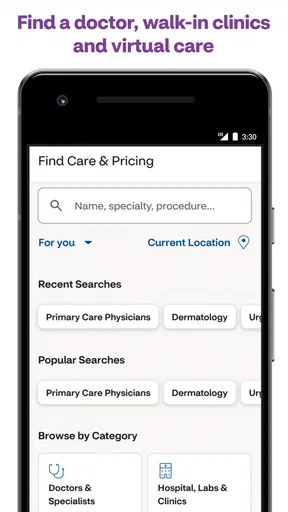
Now, let’s talk features. This app has a bunch of them, and they’re all designed to make managing your healthcare as simple as possible. One feature I found super helpful is the "Find Care" option. It lets you search for doctors, clinics, and even pharmacies near you. Plus, you can filter by specialty and insurance coverage, which makes it incredibly convenient.
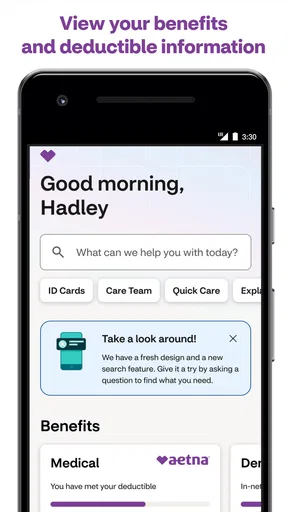
Another cool feature is the personalized dashboard. It gives you a quick glance at your benefits, claims, and even keeps track of your deductibles. It’s like having your own healthcare assistant right in your pocket. And if you’re someone who likes to stay on top of things, the reminders for appointments and medication refills are a game-changer.
Choosing care without guessing
A practical way to use Find Care is to narrow the search before you start calling offices. If you already know the specialty you need, use that filter first, then compare the nearby options that appear for your coverage. I would still contact the office to confirm it accepts my specific plan and is taking appointments; a directory is a helpful starting point, not a guarantee that every detail is current or that a clinician is available when I need one.
This is where the app differs from a generic map or search engine. Those tools can show proximity and contact details, but they don’t necessarily help me think about insurance coverage at the same time. On the other hand, if I’m choosing based mainly on clinical quality, a recommendation from my doctor or a direct conversation with a provider may matter more than a convenient in-app listing. I’d use the search to build a shortlist, not make the whole decision for me.
A realistic day-to-day workflow
Imagine I wake up with a new concern and need to find a local clinic, but I’m not sure which kind of provider to call. I can use the care search to look at nearby options and filter by specialty and coverage, then call the office to ask about availability and confirm the plan details. If I later need to understand a claim or check how a benefit applies, the dashboard gives me a place to begin instead of searching through old paperwork. The useful part is the sequence: locate, verify, then act.
I’d also use the dashboard before a planned visit, not just after a bill arrives. Checking benefits and deductible information in advance can help me prepare better questions, while a cost estimate for a treatment can offer a starting point for budgeting. I would not treat an estimate as a final bill: the actual amount can depend on the care received and how the claim is handled. When a number would change whether I proceed, I’d confirm it with the provider and insurer before committing.
Reminders and telemedicine in context
Appointment and medication-refill reminders are most useful when I treat them as prompts rather than as the sole record of my care. I’d keep important instructions from a clinician and any medication schedule somewhere I can reliably consult, then use reminders as a nudge to take the next step. That approach avoids the risk of assuming a notification itself confirms that a prescription has been renewed or an appointment has been changed.
The telemedicine option can be a convenient alternative when an in-person visit is difficult, but I would choose it according to the problem, not simply because it is available on a phone. Some concerns call for a physical examination or urgent attention. For those, I’d seek the appropriate in-person or emergency care instead of waiting for a remote conversation. For a non-urgent question where a remote consultation is suitable, the option may reduce friction, while still leaving the clinical decision to a health professional.
Another useful trade-off is keeping several sources of information in their proper roles. Aetna Health can help with insurer-facing tasks, while a clinic’s own system may be better for appointment details, test results, or messages with that practice. I wouldn’t expect one app to replace every provider portal. If I’m managing care across multiple health systems, I may still need those separate tools; the advantage here is having Aetna-related information and care searches close at hand.
Who will get the most from it
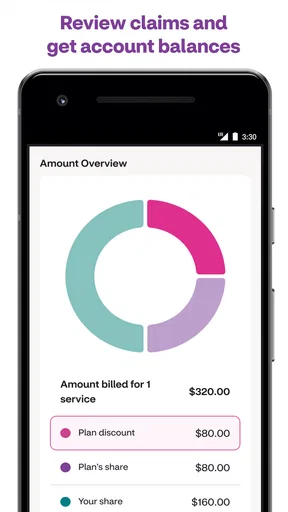
I’d recommend trying the app if you’re an Aetna member who regularly checks coverage, searches for care, or wants a convenient way to review claims and deductible information. It may be especially helpful before a planned appointment, when I can look for a suitable provider, check what my dashboard says, and prepare questions before I call. Aetna Health is free, so the decision is less about a purchase and more about whether the account tools fit your routine.
It is less compelling if you are not covered by Aetna, because the central value is tied to managing that insurer relationship. It may also not suit someone who prefers to handle sensitive matters only through phone calls or paper, or someone who expects a single app to contain every medical record and provider conversation. In those cases, the provider’s own patient portal, a direct call, or personal record-keeping may be a better fit for the task.
Limits, choices, and a cautious verdict
In the end, the app’s biggest strength is its focus: it brings together practical insurance and care-navigation tasks for Aetna users. Its main limitation is the same one I’d keep in mind with any insurer app: a convenient display can’t answer every question about eligibility, final costs, or clinical suitability. I’d use its search, dashboard, reminders, estimates, and remote-care option as tools for getting organized, then verify consequential details with the people responsible for the service.
So, would I recommend the Aetna Health app? Absolutely! It’s a solid choice for anyone looking to streamline their healthcare management. It’s packed with features that make navigating the often-confusing healthcare system a lot less daunting. If you’re insured with Aetna, downloading this app is a no-brainer.
In the end, it’s all about making life easier, and this app does just that. It’s like having a healthcare buddy at your fingertips, always ready to help you out. So go ahead, give it a try, and see how it can transform your healthcare experience.
Pros
- User-friendly interface for easy navigation.
- Comprehensive health plan management tools.
- Real-time updates on claims and benefits.
- Secure messaging with healthcare providers.
- Customizable health reminders and alerts.
Cons
- Limited availability for non-Aetna members.
- Occasional glitches in the app's performance.
- Some features require a strong internet connection.
- Notifications can be overwhelming at times.
- Limited integration with third-party health apps.
FAQs for Aetna Health
What features does the Aetna Health app offer?
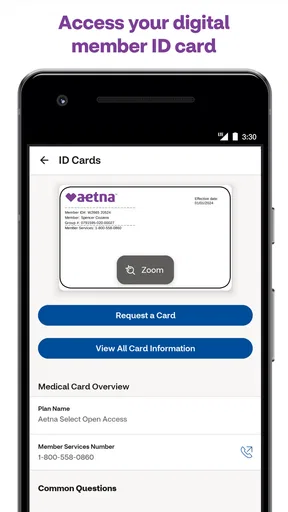
The Aetna Health app provides a comprehensive suite of features designed to simplify health management. Users can access their benefits, find in-network doctors, view claims, and manage prescriptions. Additionally, the app offers personalized health recommendations and wellness resources to support your health journey.
How secure is my personal information on the Aetna Health app?
The Aetna Health app prioritizes your privacy and security by employing advanced encryption technologies to protect your personal information. The app ensures compliance with HIPAA regulations, offering peace of mind that your health data is stored and transmitted securely.
Can I manage my family’s health information through the Aetna Health app?
Yes, the Aetna Health app allows you to manage health information for your family members. You can access their benefits, view claims, and manage their prescriptions, making it easier to keep track of your family’s healthcare needs in one convenient location.
Is the Aetna Health app compatible with all devices?
The Aetna Health app is compatible with most iOS and Android devices. To ensure optimal performance, it requires a recent version of the operating system. It’s advisable to check the app store for specific compatibility details and system requirements for your device.
How do I troubleshoot common issues with the Aetna Health app?
If you encounter issues with the Aetna Health app, try basic troubleshooting steps such as restarting your device, checking for updates, and ensuring a stable internet connection. If problems persist, the app offers in-app support and a dedicated customer service line for further assistance.


